L-MOUNT Forum

Register a free account now!

If you are registered, you get access to the members only section, can participate in the buy & sell second hand forum and last but not least you can reserve your preferred username before someone else takes it.

Interactive L-Mount Lens Table

Hello @Jan.Wedekind

Great job. Unfortunately within your last message, you post a wrong URL to a local host /server. Not available for web visitors. Z04 975
But of-course, we can use the URL, within the very early beginning of this subject. :)

https://www.endlesslycurious.net/lenses/
 
Last edited:
Quick update:

The Interactive L-Mount Lens Table has grown to over 160 lenses since I introduced it last year. With that growth, some rough edges that were tolerable at 60 lenses became annoying at 160. So I spent some time on quality-of-life improvements — for the table, and for the site as a whole.
  • The header row sticks. With 160+ rows and 15 columns, scrolling used to mean losing the column labels almost immediately, leaving you guessing whether that “0.15” was a close-focus distance or a magnification. The header now stays pinned while you scroll.
  • Click a column to sort. Every column header is now a sort button — works as you'd expect.
  • Full lens names. The name column truncates much less aggressively, and hovering still shows the full name along with a photo of the lens.
  • A tidier page. The “Latest updates” list is collapsed by default, so the filters and table fit on screen right away. The result count updates live next to the filters, and the comparison tool’s checkboxes now look like the filter checkboxes instead of tiny browser defaults.
  • Dark mode fixes. The table header and comparison buttons are properly readable in dark mode now.
As before: no tracking, no cookies, no referral links, no commercial interest. I am doing this because I want it and it's fun.
Thank you!
 
Hi folks,

I've added a few new things and a ton of lenses. Hopefully that'll make the list even more useful to some. Specifically:

  • 295 lenses in the list now, including most manual and cine lenses
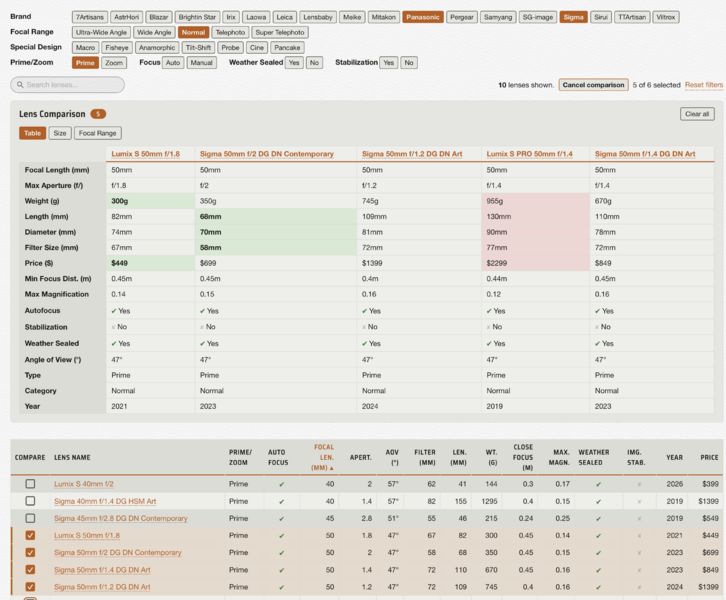
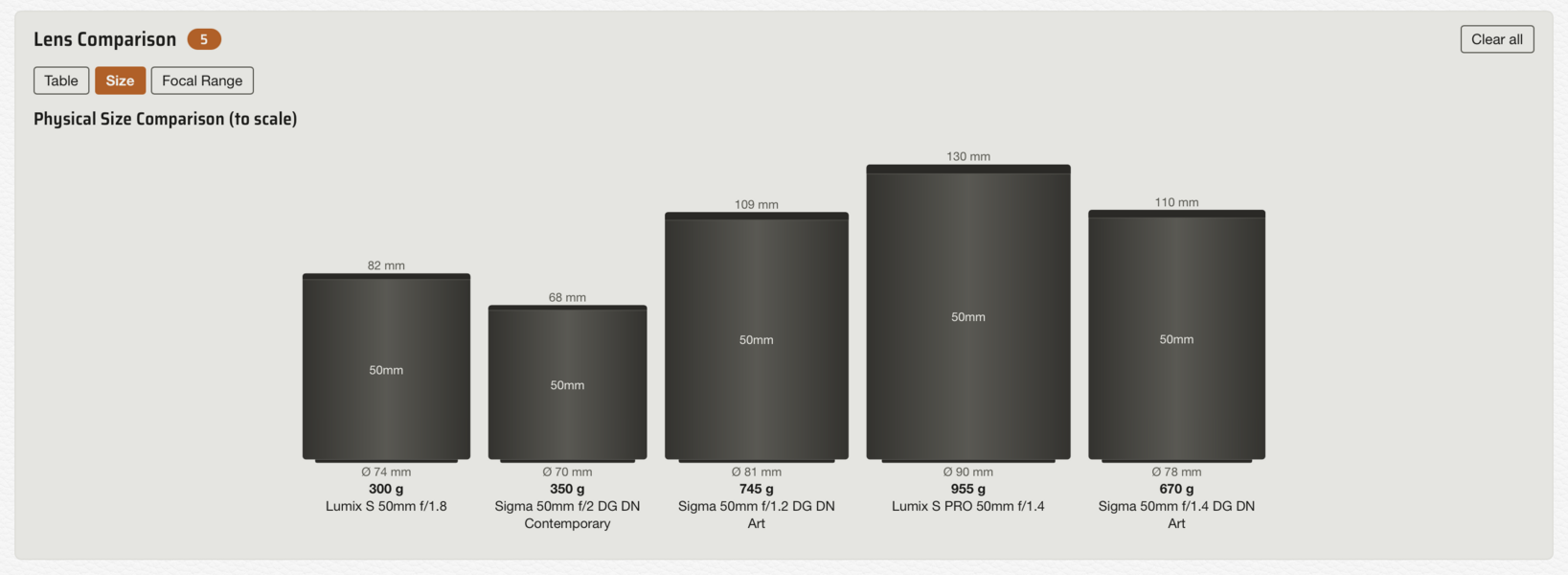
  • New comparison tool: you can select up to 6 lenses and it'll give a comparison table with highlighted cells for largest/smallest values, a visual size comparison (schematic, not photos), and a focal range map (can be useful if you select a bunch of lenses and want to visualize where you have gaps).
  • Search: right on top of the table.
  • Simpler filter boxes that also require less space
  • I backfilled quite a lot of reviews too and added key-takeaways from reviews and forums – this is obviously helped by AI but I do think the format is quite useful and neutral to get a first rough overview before diving in
Hope you find it useful. As before: I do NOT have any affiliate links on there, no any other weird crummy tracking things. I did add Goatcounter to it because I was curious if anyone is actually ever clicking on it and this was the most privacy-friendly and simple one I could find.

Feedback very much welcome of course

Screens:

Screenshot 2026-10-31 at 11.32.58.png


Screenshot 2026-10-31 at 11.33.05.png
 
I've added a few new things and a ton of lenses. Hopefully that'll make the list even more useful to some.

Feedback very much welcome of course
Hi Jan, thanks it really looks great.

I have a question: what currency is used for the price? It displays $ for me so I am guessing it is USD but just wanted to be sure.
 
Hi Jan, thanks it really looks great.

I have a question: what currency is used for the price? It displays $ for me so I am guessing it is USD but just wanted to be sure.
Great question indeed. I am trying to be consistent so it’s “RELEASE PRICE (USD)” (individual tables spell this out, it was just too long for the overview table).

I don’t have any shop/affiliate links nor do I query any retailers for current prices. So obviously some lenses will have a different “street price” but I thought release price is the fairest
 
Hi folks,
I've added a few new things and a ton of lenses. Hopefully that'll make the list even more useful to some. Specifically:
  • New comparison tool: you can select up to 6 lenses and it'll give a comparison table with highlighted cells for largest/smallest values, a visual size comparison
Hope you find it useful.

Jan, that is fantastic with what you have added here.
And that you can forward a complete URL to colleagues if you want to make a comparison among yourselves.
You put a lot of work into this. It radiates a lot of love and enjoyment for this "hobby".
It is much appreciated. Thank you.
 
Hello everyone.

Two bigger additions to the whole thing:
  • I added the option to save "my gear" on the L-Mount lens table.
  • A table for bodies

My Gear/WIshlist:
You can also mark lenses as "wish list". Once you do, you can use them as filters too. All of this is done through local web storage. The Good: no cookies, no server stuff, no tracking. It's just on your computer. The Bad: it does not sync across browser. However, once you select your gear and/or wishlist, the selection is encoded in the URL and you can save this as a simple bookmark. If you open it on a browser that doesn't have it yet, it'll offer to "import" it. Big thanks to Ruslan Belziuk for the suggestion for the my gear/wishlist and how to implement it!

Bodies:
I added a table for bodies too: https://www.endlesslycurious.net/bodies/ (side note: sorry for mixed links, I haven't had time to move the page under its own domain. Right now http://l-mount-lenses.com/ just redirects to my blog).

I really would love feedback on that one. First, because I am not a video shooter, so I might be missing something that folks really think is critical for getting an overview.
As of today, the table has 29 bodies from Panasonic, Leica, Sigma, Blackmagic and DJI. All in all, it works just like the lens table. Just like with lenses, you can also compare bodies, which lets you compare bodies side by side (see screenshot).

I also added a schematic size comparison here, which basically draws a fake camera front view, It changes by body type, which so far I categorized simply as mirrorless, rangefinder or cinema. The depth is drawn right beside it as a simple box. As for “cine” bodies: it simply draws a box too, albeit with a lens mount to scale set to the center. Cine bodies can vary so wildly that I thought this to be the simplest and fairest to just get a feel for the relative dimensions. Currently, I am not planning to add real renders of each camera. If you’re interested in this, I recommend looking at Camera Size Comparison, which I am sure most are familiar with.

My goal is to keep it super fast and simple and you can always find much more in-depth info in the linked reviews or manufacturers' websites of an item.

Hope you find it useful.

Screenshot 2026-11-13 at 15.26.14.png
 
.....
I also added a schematic size comparison here, which basically draws a fake camera front view, It changes by body type, which so far I categorized simply as mirrorless, rangefinder or cinema.
The depth is drawn right beside it as a simple box....

Hello Jan,
As for the rectangular boxes. I think I don't understand these boxes "well", or at least in first glance they are not clear ??

E.g. for the Leica SL-3S it shows a box + a size 83 mm
For the Panasonic Lumix S1RII a box + a size 92 mm
For the Sigma BF a box + a size 37 mm

I had to look "twice" to understand these dimensions has to be seen as a kind of "side view" of the camera.
Is it possible in stead of a "box", that you have more of a schematic representation of a side view.
(Perhaps an underlying choice of two or three images).

"Quick & dirty" example:

Side_1.png


-
 
Hello everyone.

Two bigger additions to the whole thing:
  • I added the option to save "my gear" on the L-Mount lens table.
  • A table for bodies

My Gear/WIshlist:
You can also mark lenses as "wish list". Once you do, you can use them as filters too. All of this is done through local web storage. The Good: no cookies, no server stuff, no tracking. It's just on your computer. The Bad: it does not sync across browser. However, once you select your gear and/or wishlist, the selection is encoded in the URL and you can save this as a simple bookmark. If you open it on a browser that doesn't have it yet, it'll offer to "import" it. Big thanks to Ruslan Belziuk for the suggestion for the my gear/wishlist and how to implement it!

Bodies:
I added a table for bodies too: https://www.endlesslycurious.net/bodies/ (side note: sorry for mixed links, I haven't had time to move the page under its own domain. Right now http://l-mount-lenses.com/ just redirects to my blog).

I really would love feedback on that one. First, because I am not a video shooter, so I might be missing something that folks really think is critical for getting an overview.
As of today, the table has 29 bodies from Panasonic, Leica, Sigma, Blackmagic and DJI. All in all, it works just like the lens table. Just like with lenses, you can also compare bodies, which lets you compare bodies side by side (see screenshot).

I also added a schematic size comparison here, which basically draws a fake camera front view, It changes by body type, which so far I categorized simply as mirrorless, rangefinder or cinema. The depth is drawn right beside it as a simple box. As for “cine” bodies: it simply draws a box too, albeit with a lens mount to scale set to the center. Cine bodies can vary so wildly that I thought this to be the simplest and fairest to just get a feel for the relative dimensions. Currently, I am not planning to add real renders of each camera. If you’re interested in this, I recommend looking at Camera Size Comparison, which I am sure most are familiar with.

My goal is to keep it super fast and simple and you can always find much more in-depth info in the linked reviews or manufacturers' websites of an item.

Hope you find it useful.

View attachment 18533
Excellent, Jan. I just miss in the list of bodies the new Sigma FP2. That would make 30 cameras from 5 different brands... not bad at all... thank you for your web, it is really useful!
 
Hello Jan,
As for the rectangular boxes. I think I don't understand these boxes "well", or at least in first glance they are not clear ??

E.g. for the Leica SL-3S it shows a box + a size 83 mm
For the Panasonic Lumix S1RII a box + a size 92 mm
For the Sigma BF a box + a size 37 mm

I had to look "twice" to understand these dimensions has to be seen as a kind of "side view" of the camera.
Is it possible in stead of a "box", that you have more of a schematic representation of a side view.
(Perhaps an underlying choice of two or three images).

"Quick & dirty" example:

Yes, totally, it's on my list. Just did not have time yet. I didn't want to futz with having to parameterize images. Claude could probably do it but it would also make the whole thing much slower to load if you have e.g. 5 bodies next to each other and I hate that. The whole point for me, personally, is that everything is instant and snappy.

I reverted to a simple box because, contrary to the front view, there was no obvious archetypical shape. An FP2 or S9 arguably is mostly just a rectangular box from the side with no EVF or fake mirror box. Anyway, those are just excuses, I will improve it for sure!

Thanks for the feedback!


@Jan.Wedekind

Thanks for the great list!

Since I've been staring a lot lately at Blackmagic Design's spec sheet for their "Cinema Camera 6K" (I'm s-t-i-l-l considering buying one), a few comments:

EVF: I'm not sure if you note this for other cameras, but BMD offers a mini-OLED EVF for the CC6K, the "Blackmagic Pocket Cinema Camera Pro EVF" (it works with both their CC6K and the PCCP cameras.) Its resolution is 1280 x 960.

Slow-Mo: Although it's true the CC6K has a FHD 120 fps recording mode for slow-mo, I think many (most?) shooters -- for slow-mo -- will instead use its Open Gate 36 fps, or "5K" Anamorphic 6:5 36 fps, or 6K DCI 17:9 48 fps, or 6K 2.4:1 60 fps. There are also a few additional combinations available at resolutions higher than FHD. Of course, I realize there's not enough room on your table for this much info, but just saying. :)

Card Slots: The CC6K has 1 (one) CFexpress Type B card slot, plus a USB-C port for recording to an external, user-supplied SSD.

Weight: The CC6K weighs 1162 grams (body only).

Battery: Maybe list the battery type? The CC6K's internal battery slot can hold a single "NP-F570" type battery.

Cheers!
 
Back
Top